Product Add-ons on Shopify with Vitals: add-on upsells, pricing and setup
Last updated on October 28, 2026
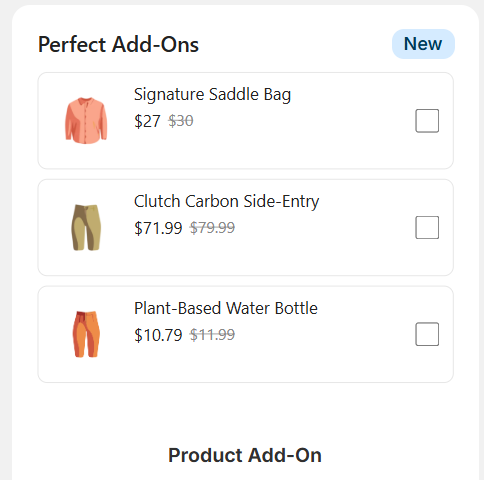
Yes, Vitals does product add-on upsells on Shopify. The Vitals app (Vitals: Reviews, Bundles & 40+ on the Shopify App Store) includes a Product Add-on offer in Upsell Builder that shows small extras, such as accessories, services or gift wrapping, near the Add to Cart button, with an optional discount.
➕ Product Add-ons at a glance
| Question | Answer |
|---|---|
| What it shows | Companion products near the Add to Cart button on the product page, and in the cart if you turn on the Cart page placement |
| Product choice | Pick products manually, pull from a collection or use smart matching, set whether shoppers can choose one add-on or multiple add-ons on the product page, and add per-offer exclusions |
| Discount | Optional: percentage off, amount off or a fixed price |
| Display controls | Review stars, compare-at price, card styling and device visibility |
| Cart | Add-ons join the cart nested under the main product |
| Pricing | Included in the Vitals All-in-One plan, $29.99/month, with a 7-day free trial. Orders from Upsell Builder offers count toward Direct Revenue Assists: the first $1,000 a month is free, then usage fees start at $40/month (how usage tiers work). See the Shopify App Store listing for current pricing. |
When to use this: You want to offer small extras — accessories, services, gift wrapping — alongside a main product.
To create a Product Add-On offer, go to Upsell Builder > Offers > Create bundle > Smart Additions and click Choose on a layout. In the offer editor, under Smart Additions type, select Add-ons.
Product Add-On is similar to Related Products Upsell, but with a different intent and position. It sits closer to the Add to Cart button and is meant for small companion items, not full alternative products. You can run both at the same time: Add-On near the ATC button, Related Products further down the page.
To move the Product Add-On widget, open its Product page placement and select Customize appearance → Position. This setting is shared by all your Product Add-On offers and applies to every theme with the Vitals app embed enabled. For a different position on one Online Store 2.0 theme only, go to Shopify admin → Online Store → Themes → Edit theme next to that theme. In the template menu at the top, select Products and the product template, then in the product section click Add block → Apps → Product Add-On. Move the block where you want the widget to appear and click Save.
It supports the same controls as Related Products: review stars, compare-at price toggles, card styling, device visibility, and per-offer exclusions. You can curate manually, pull from a collection, or use smart matching, and add an optional discount (percentage or fixed amount).
Note on pricing: Add-On discounts are always calculated from the product's Shopify selling price, not its compare-at price. The Calculate discount from setting only controls which price is shown struck through. To offer the same product at a discounted add-on price and also recommend it at full price elsewhere on the page, create a separate Related Products offer with no discount.
Frequently Asked Questions (FAQs)
Does Vitals have a product add-ons app for Shopify?
Yes. The Product Add-on offer in Vitals Upsell Builder shows accessories, services or gift wrapping next to Add to Cart. It is part of the Vitals app, together with bundles, volume discounts, product reviews and 40+ other apps.
What is the difference between Product Add-ons and Related Products?
Product Add-ons sit near the Add to Cart button and are for small companion items. Related Products shows full products further down the page that shoppers add one by one. You can run both on the same page.
How much do product add-ons cost?
Included in the Vitals All-in-One plan at $29.99/month, with a 7-day free trial. Orders from Upsell Builder offers count toward Direct Revenue Assists: the first $1,000 a month is free, then usage fees start at $40/month. Check the Shopify App Store listing for current pricing.