Cookie consent banner on Shopify with Vitals: features, pricing and setup
Last updated on October 28, 2026
Yes, Vitals adds a cookie consent banner to Shopify. The Cookie Banner app is part of Vitals: Reviews, Bundles & 40+ on the Shopify App Store. It shows a GDPR-style Cookie Consent Banner with Accept and Decline buttons to visitors in the regions you select in Shopify's Customer Privacy settings, and an Informative Cookie Banner to everyone else. Visitor choices are saved to Shopify through its Customer Privacy API.
Cookie Banner at a glance
| Question | Answer |
|---|---|
| Banner types | Cookie Consent Banner (Accept and Decline, so visitors can reject non-essential cookies) and Informative Cookie Banner (an I Accept notice). Use one or both |
| Who sees which | Visitors in the regions selected under Shopify admin > Settings > Customer Privacy see the consent banner. Others see the informative banner |
| Consent handling | Works with Shopify's Customer Privacy API, through the Use custom cookie banner option in Shopify |
| Layout | Floating or Fixed Bottom, with your own colours, message and button texts |
| Privacy policy | A Learn More link to your Privacy Policy URL (required for the consent banner) |
| Languages | Translations for multi-language stores, under Localization |
| Pricing | Included in the Vitals All-in-One plan, $29.99/month, with a 7-day free trial. See the Shopify App Store listing for current pricing. |
Which cookie banner fits?
| You need | Use this |
|---|---|
| Consent before non-essential cookies for EU, EEA and UK visitors | Cookie Consent Banner, with Use custom cookie banner chosen in Shopify Customer Privacy |
| A simple notice that the store uses cookies | Informative Cookie Banner |
| Consent in selected regions and a notice everywhere else | Both banners switched on |
When Cookie Banner is not the right fit
- You want to keep Shopify's own cookie banner. Use one consent banner at a time: to use the Vitals Cookie Consent Banner, choose Use custom cookie banner in Shopify Customer Privacy, as described below.
- You need legal advice on your cookie setup. The app asks for and records consent. Your privacy policy and wording are still up to you.
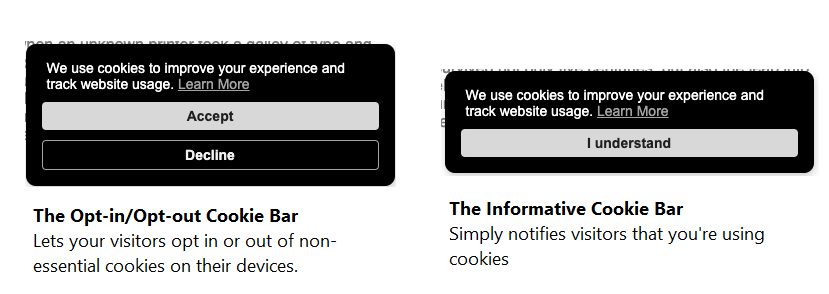
If you are catering to a global audience, especially visitors from select European regions, the Cookie Banner app can provide you peace of mind that customer privacy laws are appropriately followed by asking your customers first to provide their consent.
Before you begin
- If you have visitors from select European regions (EU, EEA, and UK), you may need to ensure first that your store will only allow visitor data to be collected from them when they provide their consent.
- This can be updated by going to your Shopify admin > Settings > Customer Privacy and enabling your store to use a custom cookie banner. Below are the steps:
- Go to Shopify admin > Settings > Customer Privacy:
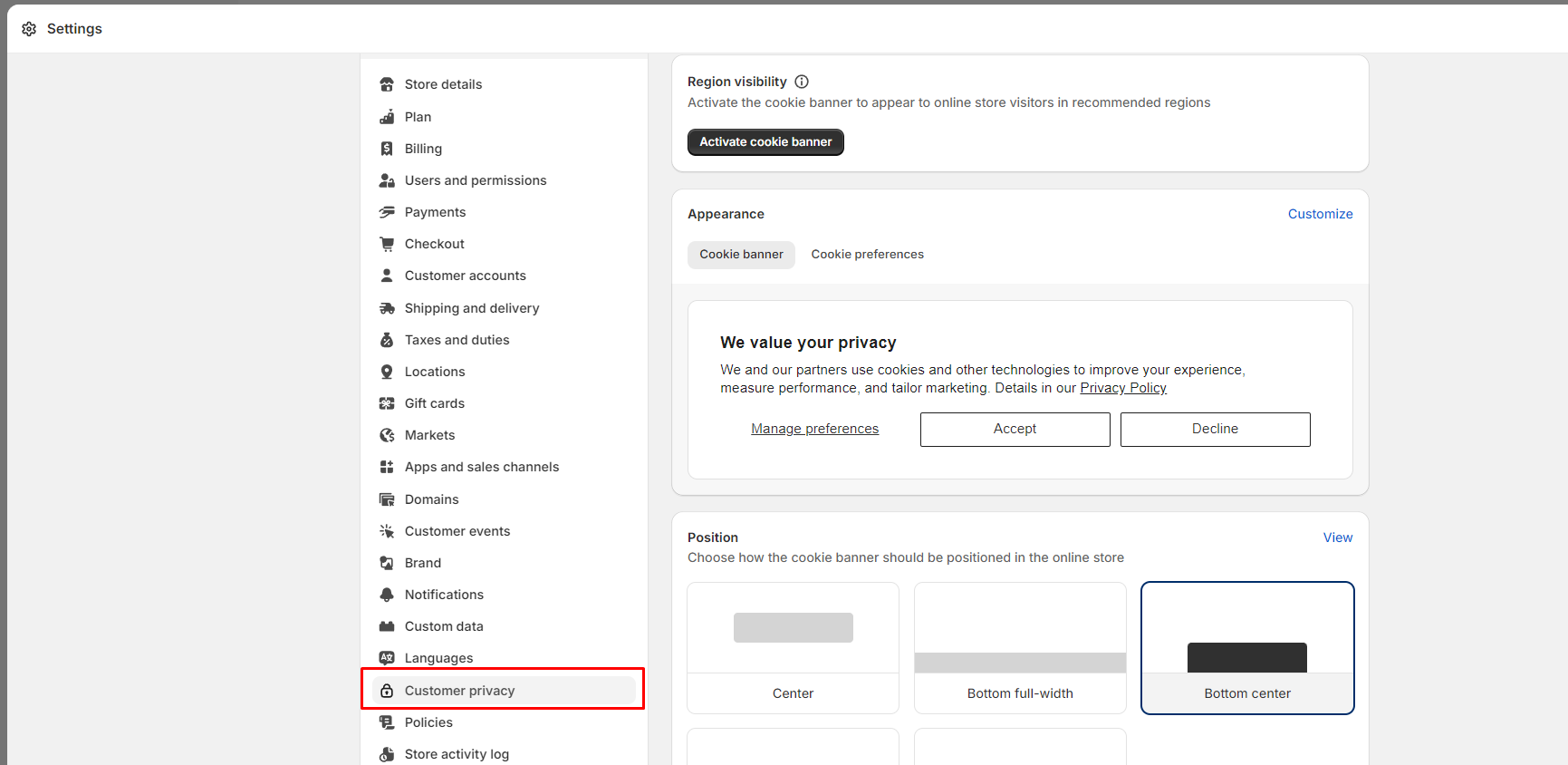
From here, you have two options that you can do - either use Shopify's own Cookie Banner feature, or you can use one from a different app, such as our Cookie Banner app.
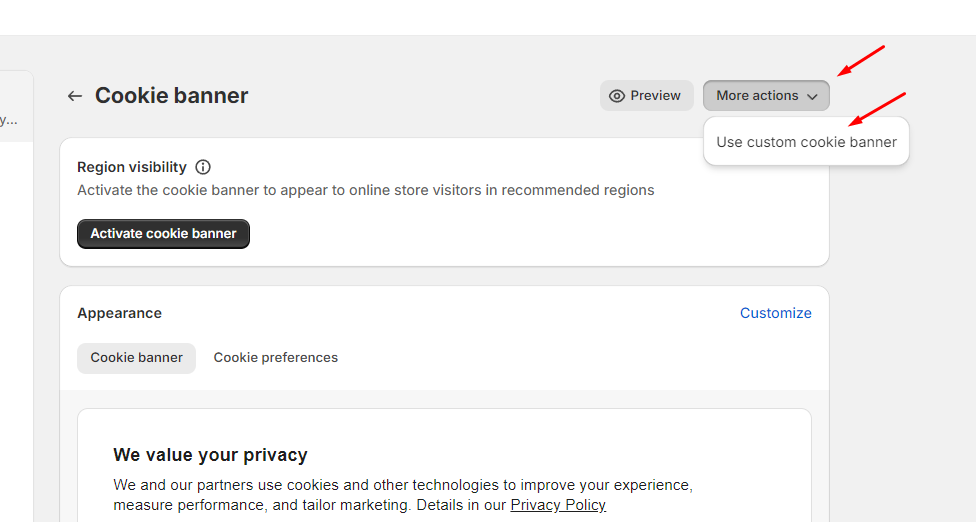
- Click on More Actions > Use Custom Cookie banner;
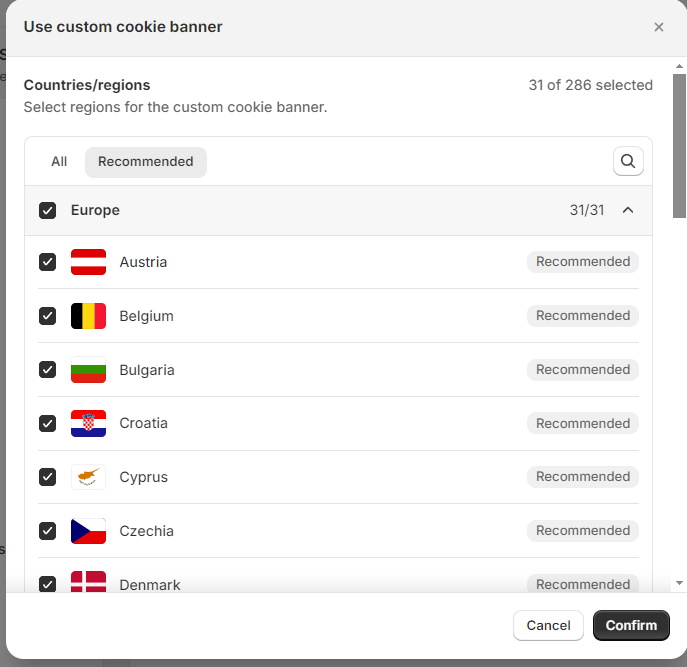
- You will be provided a list of countries where you would like the Cookie Banner app to appear. (Note that Shopify has already pre-selected the recommended regions that should need consent, and you will be able to confirm it.)
💡 Another setting to check is to ensure that your store has a published Privacy Policy or Cookies Policy with its URL. For more information about this and how to create one, you can refer to this resource from Shopify's Help Center: Shopify Help Center - Adding store policies.
Once these are correctly established, it's time to set up the Cookies Banner app from the Vitals User Admin.
Setting up the Cookie Banner app
Upon opening the Vitals app you can look for the Cookie Banner app by clicking the Apps menu on the sidebar, and then finding the Cookie Banner app under the Protect category.
General and Design Settings
- The General and Design settings contain the different appearance settings of the Cookies Banner app. It has various customizable settings like the type of Cookies Banner (Floating or Fixed Bottom) and the colors of its parts.
- This section also contains an area for the URL of your Privacy Policy. Once placed, this will be the page that visitors will be brought to if the Learn More message is clicked.
💡 The Learn More & URL of your Privacy Policy fields are mandatory for the Cookie Consent Banner
Once you're satisfied with the General settings, you can now explore the two types of Cookie Banners that you can enable with the app.
The Cookie Consent Banner
This is the Cookie Banner that allows your store to ask for visitors' consent before allowing non-essential cookies to be triggered on your store.
- This type of Cookie Banner will only show up if three things happen:
- You go to the online store's "Customer Privacy" and choose the "Use Custom Cookie banner" option (steps provided above).
- The person visiting your store is from those selected regions.
- The Cookie Consent Banner's Status is set to Active in Vitals. It is Inactive by default.
At the top of the Cookie Consent Banner settings, a reminder box asks you to enable Use custom cookie banner in Shopify, with a Go to Cookie Banner settings button that opens the right Shopify page.
Within the settings of the Cookie Consent Banner type, you can change different appearance options, like the main message itself, the Accept and Decline buttons, and their respective colors.
💡 If your store supports multiple languages, you can view how they are translated (and change them accordingly) by clicking Translate at the top of this app's page.
Informative Cookie Banner
This is the traditional Informative Cookie Banner, which merely notifies visitors that you're using cookies, and by using the website, you consent.
If this Cookie Banner is active, it will appear to visitors who are outside of the regions you have defined under your Customer Privacy settings in your Shopify admin. It is Active by default; set its Status to Inactive if you only want the Cookie Consent Banner.
With the Informative Cookie Banner, no consent is required. It implies that visitors automatically accept your Privacy Policy by using your service.
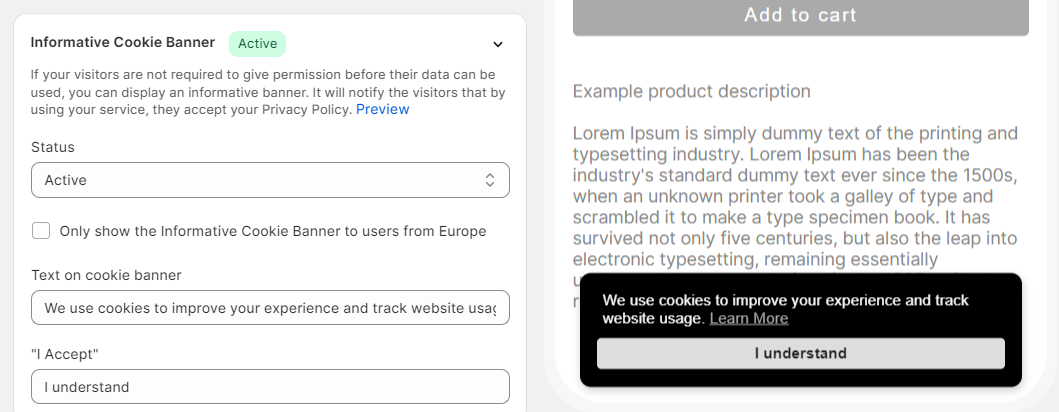
Settings such as the Text on the cookie banner and the text of the I Accept button can be changed here.
💡 If the Only show the Informative Cookie Banner to users from Europe is unchecked, all visitors from all over the world will see this Informative Cookie Banner.
Frequently Asked Questions
Does Vitals have a cookie consent banner for Shopify?
Yes. The Cookie Banner app shows a Cookie Consent Banner with Accept and Decline buttons to visitors in the regions you choose in Shopify Customer Privacy, and an Informative Cookie Banner to other visitors.
How much does the Vitals Cookie Banner cost?
It is included in the Vitals All-in-One plan at $29.99/month, with a 7-day free trial. Check the Shopify App Store listing for current pricing.
Does it work with Shopify's Customer Privacy settings?
Yes. Choose Use custom cookie banner under Shopify admin > Settings > Customer Privacy and select the regions. Vitals then shows the consent banner to visitors from those regions and saves their choice through Shopify's Customer Privacy API.
If I have both Cookie Banners enabled, which of them and to whom will it appear on my store?
| Store Preferences | Visitor from EU | Visitor from non-EU |
|---|---|---|
| Chose "Use a Custom Cookie banner" under Shopify admin > Settings > Customer Privacy and selected the recommended countries | Cookie Consent Banner | Informative |
| No actions taken inside Shopify admin > Settings > Customer Privacy | Informative | Informative |
What if a visitor wants to change his consent answer? For example, he Declined the consent, but now he wants to Accept it.
Add a link that reopens the cookie banner, for example in your privacy policy or footer menu. Visitors can click it to change their answer. See Allow your visitors to modify their consent options.
Why does my analytics count of impressions show less than the traffic I have?
Your store is probably configured to allow customers from EU to reject cookies. Until cookie usage is accepted, analytics impression events will not be triggered. You can find more details here.