Set Up The Cart Notice App
Last updated on October 26, 2026
Just like our Stock Scarcity app, the Cart Notice app is a simple app that can have a massive impact on your store's orders. It creates a sense of urgency for your visitors to finalize the order and not let the products they added to Cart expire!
💡 Depending on your store's Customer Privacy settings, this app may not appear for your selected visitors until they provided their consent. For more information about this, you may refer here: Consent requirements for various apps
you can customize it to fit your store's design.
The Cart Notice app already have default settings that will be used when immediately enabled. However, you can customize these contents to fit your store's messaging. Below are some settings of interest that you can modify:
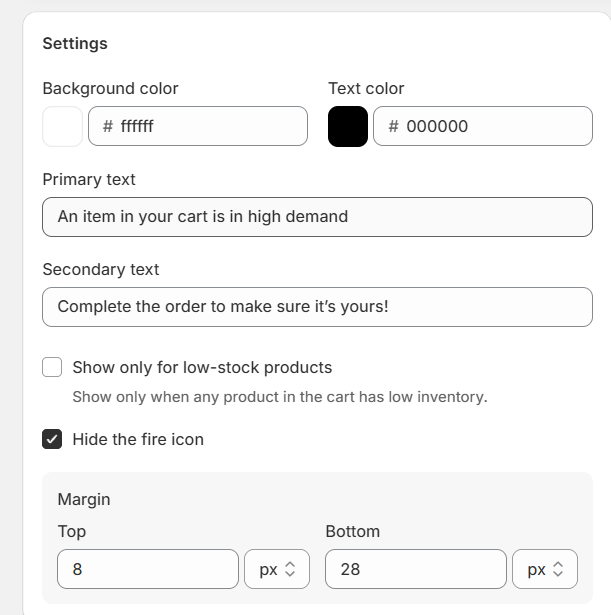
- Background and Text Colors
- Cart notice title
- Secondary Text - This text will appear in the second line of the Cart Notice app.
The Cart Notice app is not available for theme/third-party Cart Drawers / Ajax Carts due to technical and design reasons. However, it greatly works with our new Vitals Cart Drawer app. For more information about this new app, you may refer to our article here: How to Use the Vitals Cart Drawer App
Frequently Asked Questions (FAQs)
[Q] I have my own theme/third-party cart drawer. Can I display the Cart Notice app there?
[A] Not at the moment, as theme/third-party cart drawers have highly dynamic and unpredictable behaviors. However, our Cart Notice app properly works with our Vitals Cart Drawer app.