Favicon Cart Count on Shopify with Vitals: features, pricing and setup
Last updated on October 26, 2026

Yes, Vitals shows the cart count on your Shopify store's favicon (the browser tab icon). The Vitals app (Vitals: Reviews, Bundles & 40+ on the Shopify App Store) includes Favicon Cart Count, which draws a badge with the number of items in the shopper's cart over your favicon, so your tab stands out among the others. It comes in the same plan as product reviews, bundles and 40+ other apps.
Favicon Cart Count at a glance
| Question | Answer |
|---|---|
| What it does | Shows the number of cart items as a badge on your store's favicon. The badge appears once the cart has at least one item. |
| Where it shows | The browser tab, on desktop browsers such as Chrome, Firefox and Opera. It does not show in Safari. |
| Options | Shape (Circle or Rectangle), The location of the bullet. (any of the four corners), Animation (Slide, Fade, Pop, Pop & Fade or none), Badge color, Text color and Animation repetition interval (how often the badge blinks while the shopper is on another tab, or Never) |
| Requirement | Add a favicon in your theme settings so the badge sits on your store icon. Without one, Vitals shows the badge on a blank icon. See Adding a favicon to your Shopify store. |
| Pricing | Included in the Vitals All-in-One plan, $29.99/month, with a 7-day free trial. See the Shopify App Store listing for current pricing. |
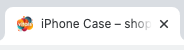
The Favicon Cart Count app works by displaying the number of items added to the cart over the browser's favicon, helping your store's browser tab stand out.
⇒ 
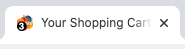
Add a favicon to your store so the badge sits on your icon. Check this 1-minute guide on adding a favicon to a Shopify theme.
You can customize the shape of the number's background, location, colors, and even add an animation - make it slide, fade or pop. The app currently works only on desktop browsers, such as Chrome, Firefox, and Opera.
Frequently Asked Questions
Does Vitals have a favicon cart count app for Shopify?
Yes. Favicon Cart Count is part of the Vitals app. Turn it on in Vitals > Apps > Favicon Cart Count with Activate app.
Why don't I see the badge on my tab?
Check two things: the cart has at least one item (the badge updates when the next page loads), and you are not using Safari, where the badge is not shown.
Can I change the favicon image itself in Vitals?
No. Vitals draws the badge on the favicon your theme already uses. You set the favicon in your Shopify theme settings.