Inactive Tab Message on Shopify with Vitals: features, pricing and setup
Last updated on October 26, 2026

Yes, Vitals changes your Shopify store's browser tab title when a shopper switches to another tab. The Vitals app (Vitals: Reviews, Bundles & 40+ on the Shopify App Store) includes Inactive Tab Message, which shows your own message in the tab title while the shopper is away, to remind them to come back. It comes in the same plan as product reviews, bundles and 40+ other apps.
Inactive Tab Message at a glance
| Question | Answer |
|---|---|
| What it does | Replaces the tab title with your message when the shopper switches to another tab, and puts the original title back when they return |
| Where it shows | The browser tab title, on every storefront page |
| Options | One Message field. The default is ☞ Don't forget this... and emojis are supported. |
| Languages | A Translate action appears for stores that sell in more than one language, or in one language other than English |
| Limits | No delay, blinking or animation settings, and no page targeting |
| Pricing | Included in the Vitals All-in-One plan, $29.99/month, with a 7-day free trial. See the Shopify App Store listing for current pricing. |
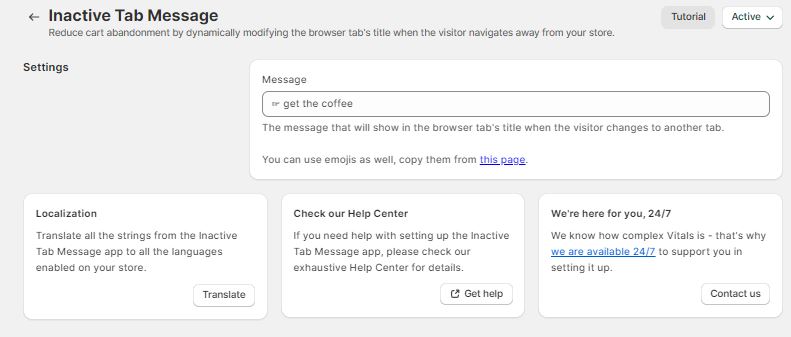
This app reduces cart abandonment by dynamically modifying the browser tab's title when the visitors navigate away from your store. You can customize the message that shows on the page title, don't forget to use emojis, and make sure your visitors remember to return.

Frequently Asked Questions
Does Vitals have an inactive tab message app for Shopify?
Yes. Inactive Tab Message is part of the Vitals app. Turn it on in Vitals > Apps > Inactive Tab Message with Activate app.
Can I change the message in the tab?
Yes. Edit the Message field in the app's Settings section. You can use emojis.
Why does my store's tab say "Don't forget this"?
That is this app's default message. Change it in the Message field, or switch the app off with Active > Deactivate Inactive Tab Message.