Understanding App Value Pulse in Your Vitals Dashboard
Last updated on August 18, 2026
App Value Pulse is the small coloured chip Vitals shows next to your apps, and it exists to answer one question at a glance: is this app actually doing anything for my store?
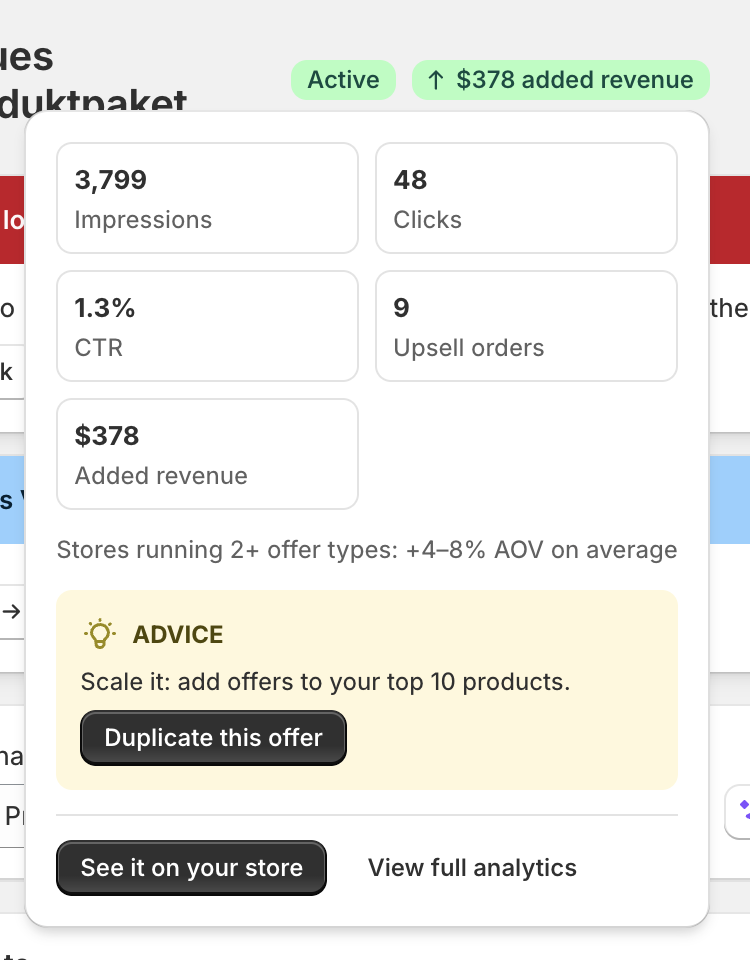
Where there's live data, the chip shows your real result. Where there isn't yet, it shows an estimate of what the app could do for a store your size. And when an app is switched on but shoppers still can't see it, the chip says so — and tells you how to fix it.
Hover over any chip to open a card with the detail behind it.
Where you'll see it
- On an app's own page, next to the Active toggle.
- On sub-app pages — for example, each Upsell Builder offer type.
- On individual items: an Upsell Builder offer, a pop-up, an announcement bar, or a product label.
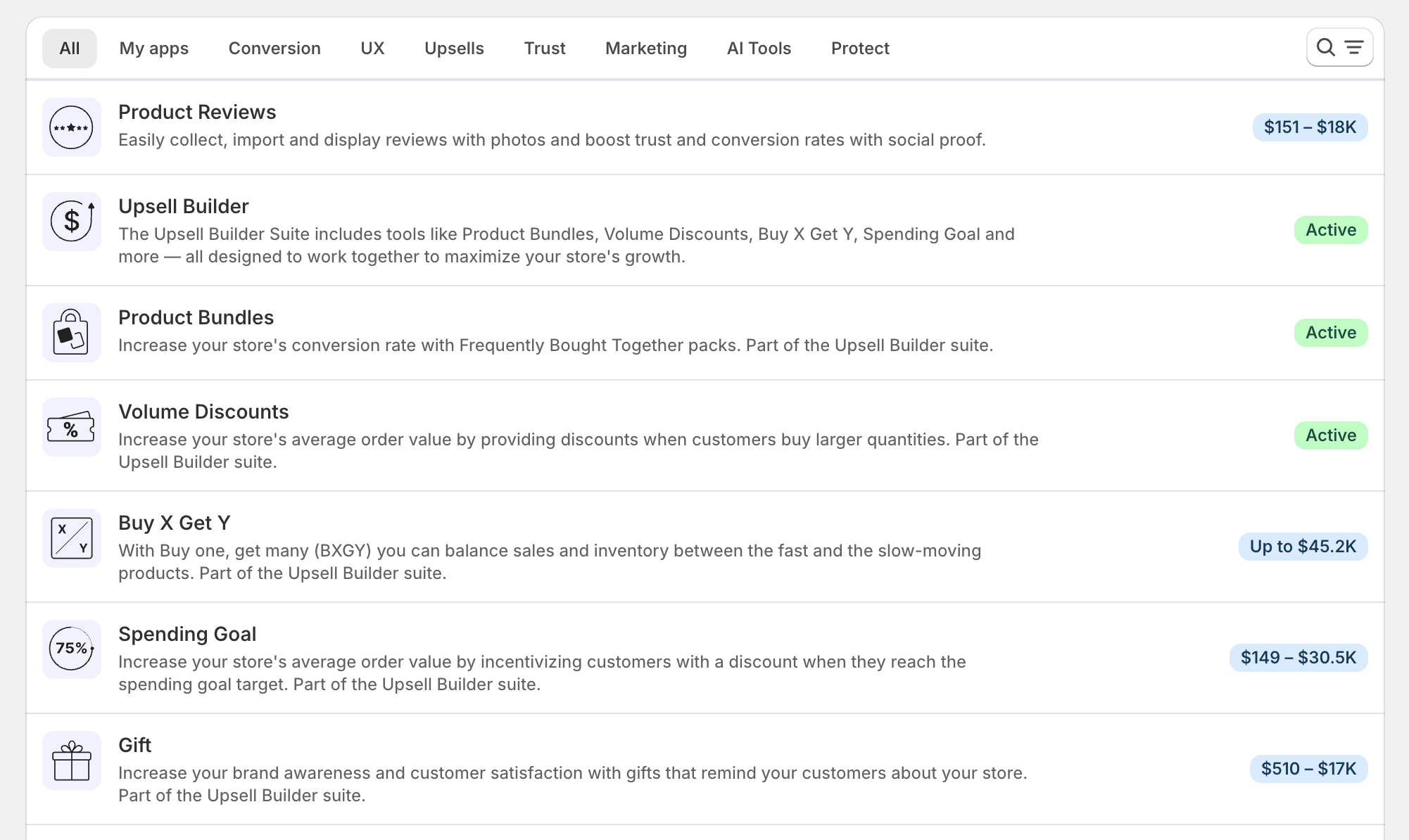
On the Apps page, as a blue estimate on apps you haven't switched on yet.
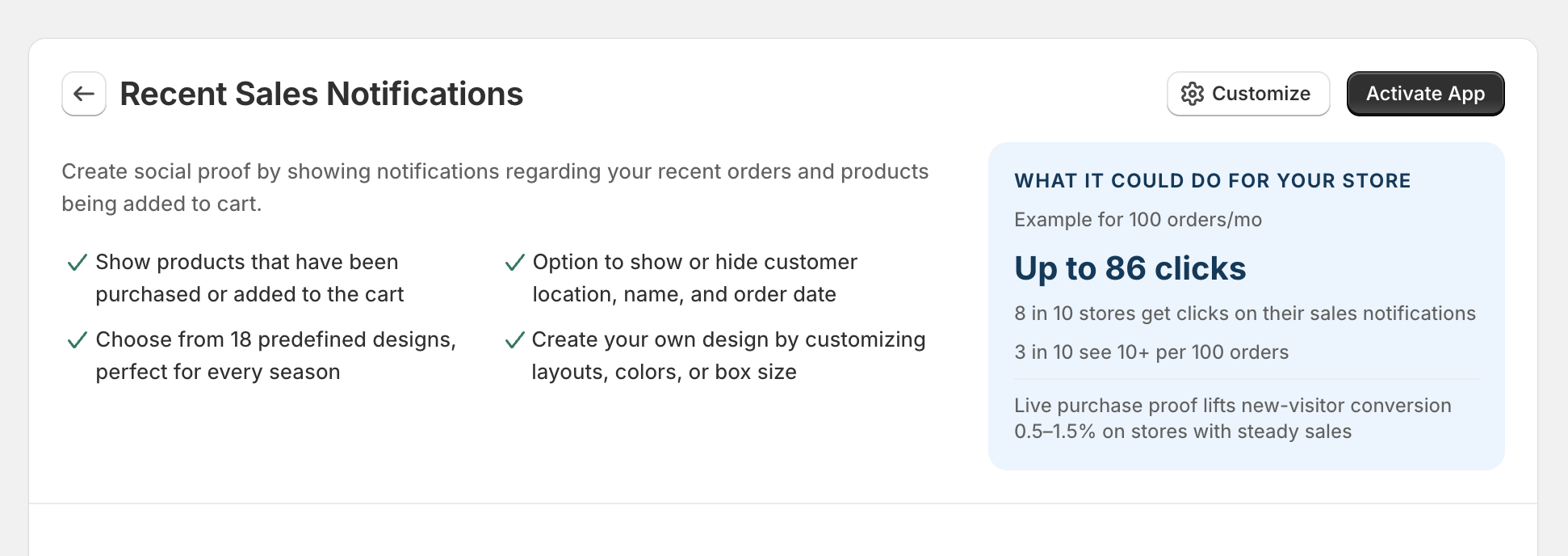
On an app's start page, as a "What it could do for your store" panel.
What each chip means
| Chip | What it means |
|---|---|
| Green, with a number | The app is live and shoppers are seeing it. The number is your own recorded result. It's never an estimate. |
| Blue, with a number | An estimate of what the app could do, shown before there's enough live data to report on. |
| Green "Live" | The app is on and working, but it isn't the kind of app that produces a number to report. Shown on apps that confirm they're doing their job rather than measure it. |
| Blue "See value" | The same kind of app as above, but currently switched off. Hover it to see what it would do for you. |
| Amber "Setup needed" | The app is switched on, but shoppers still can't see it. Hover the chip and the card names the one thing that's blocking it. |
💡 A green chip only ever appears once there's a real, positive result to show. Vitals will never dress an estimate up as a live number.
What the hover card shows
When the app is live
The card is headed "[App name] is live on your store" and shows the figures that app has actually recorded — impressions, clicks, orders, added revenue, or whichever measures fit that app.
Up to two buttons appear at the bottom, depending on what's available:
- See it on your store — opens the page where the widget is showing, so you can look at it the way a shopper does.
- View full analytics — opens that app's full Analytics page.
- An advice action, when Vitals has spotted something specific worth adjusting.
When it's still an estimate
The card is headed "What [App name] could do for your store" and shows an estimated range, a line reading "Example for [number] orders/mo", and a short note on how often stores see that kind of result.
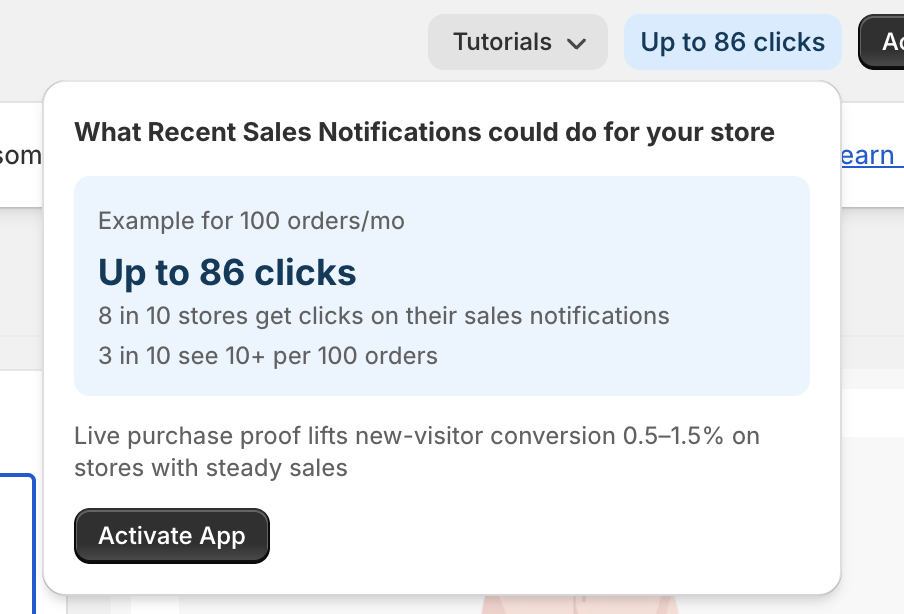
If the app isn't switched on yet, an Activate App button appears so you can turn it on from the card.
When it says "Setup needed"
The card is headed "One step left before you go live", with the reassurance that everything's configured — shoppers just can't see it yet. Below that you'll find:
- A checklist showing what's already passed and the one thing that hasn't. Checks include App is switched on, Theme app embed is on, Published, Has a placement, and Seen by shoppers.
- A highlighted box, "The one thing blocking you", explaining the blocker in plain language.
Clearing a "Setup needed" chip
There are three things that put an app in this state.
The Vitals app embed is turned off
Shopify requires the Vitals app embed to be enabled in your theme before any Vitals widget can appear on your store. The card gives you an Enable app embed button that turns it on for you in place — it takes a few seconds and you don't need to open the theme editor.
If that doesn't succeed, you can enable it manually: see Enabling the Vitals app via App Embed.
Nothing is published yet
The app is on, but there's nothing live for shoppers to see. Publish an existing draft, or create your first item. There's no button for this one — the controls you need are already on the page you're looking at.
On an individual item, the wording is more specific: that item isn't published yet, so publishing it is all that's needed.
A published offer has no placement
The offer is published but has nowhere to appear, so it never shows. Enable a placement on it and the chip clears.
Why two stores see different estimates
Estimates are grouped by store size rather than calculated from your own traffic. Vitals matches your store to the closest size band based on your orders over the last 30 days, and shows results measured from real stores in that band — which is what the "Example for [number] orders/mo" line is telling you.
This means the same app can show a very different estimate on a small store than on a large one. It also means the estimate is a realistic reference point rather than a forecast — treat it as "here's what stores like mine tend to get", not as a number Vitals expects you to earn.
Why some apps show no chip at all
A missing chip is not a fault. A chip only appears where there's something honest to say, so you won't see one when:
- The app isn't covered by App Value Pulse yet.
- The figures are still loading — give it a moment.
- You're on the Apps page looking at an app that's already Active. There, the chip exists to show what an app could do before you switch it on, so it drops away once you have.
- The app has nothing to report and nothing to estimate.
Tips
- Hovering the chip is the quickest way to answer "why isn't my widget showing?" — the Setup needed card runs the same checks a support agent would, in one step.
- If you're deciding which app to try next, browse the Apps page and compare the blue estimates. They're matched to your store size, so they're a fair basis for comparison.
- Once an app goes live, come back to its chip after a few days. A green chip with your own number is the clearest sign the app is earning its place.
FAQ
Is a blue chip a promise of what I'll earn?
No. A blue chip is an estimate based on measured results from real stores of a similar size to yours, shown while your own store doesn't have enough data yet. Your actual results depend on your products, traffic and how you set the app up. Once Vitals has recorded a real result for you, the chip turns green and shows your number instead.
My app is switched on and says "Active", so why does the chip say "Setup needed"?
"Active" and "visible to shoppers" aren't the same thing. An app can be switched on while the Vitals app embed is off in your theme, or while nothing has been published, or while a published offer has no placement chosen. The chip is telling you about that second step. Hover it and the card names exactly which one applies.
One of my apps has no chip. Is something broken?
No. Chips only appear where there's something to say — a real result, or a meaningful estimate. An app with neither simply shows no chip, and apps you've already switched on don't carry one on the Apps page. Nothing is wrong with your store.
Why did confetti appear on my screen?
That's App Value Pulse marking a milestone. The first time shoppers see one of your apps — and again at moments like your first attributed sale — the card celebrates it with a short message and a burst of confetti. It's just a notification that something good happened; nothing needs doing.
Do my customers see these chips?
No. App Value Pulse exists only inside your Vitals dashboard. Nothing about it appears on your storefront.
Why does the number on the chip differ from what I see in Analytics?
The chip leads with a single headline figure for that app, over the same period the app's Analytics page uses. Analytics shows the full picture, including measures the chip has no room for. If the two look genuinely inconsistent rather than simply different in scope, contact our 24/7 support team and we'll take a look.
❓ Still can't get an app to show on your storefront? Start with the chip's Setup needed card, then see Enabling the Vitals app via App Embed. Our support team is available 24/7 if you'd rather we check it for you.