Resolving "Review" and "aggregateRating" Missing in Google Search Console
Last updated on October 22, 2026
If Google Search Console — or the Rich Results Test — tells you the review and aggregateRating fields are missing on your product pages even though those products have reviews in Vitals, this article explains what's happening and how to confirm it. In almost every case, the warning isn't coming from Vitals.
Is this for me? Use this article if you have active Product Reviews on your store and Google reports
revieworaggregateRatingas missing (often shown as "non-critical issues"). If your stars simply haven't appeared in Google search results yet, that's a different topic — see Product Reviews Rich SnippetsBefore you start: Make sure you're looking at the right tool. Google Search Console / Rich Results Test relates to the "Display the review rating and count in Google search setting in Product Reviews". Google Merchant Center / Google Shopping is a separate feed (it generates its own XML link under Product Reviews > Settings) and reports issues differently.
Why this happens
Your store usually has more than one app adding product structured data (JSON-LD) to each page. When Google crawls a product page, it can detect several Product items — one from Vitals, and others from apps like a Google Shopping feed. The "missing review / aggregateRating" warning belongs to whichever item is missing those fields, and that's typically another app's schema or from the theme files, not Vitals'.
Vitals stores your review rating and count in Shopify's official metafields. All of your review data is synced to those official metafields — we don't use custom metafields for it — so the aggregateRating value that Vitals outputs (your average rating and review count, for products with at least one published review) is present and correct. Vitals doesn't list individual reviews, so Google may show review as an optional (non-critical) missing field on the Vitals item; that one is expected. That's why the warning, when you trace it, points to a different block of data on the page.
How to confirm it isn't Vitals
You can check this yourself in a couple of minutes:
- Run one of your product URLs through the Rich Results Test.
- In the results, Google will list the detected items. Click the item showing the missing-field warning.
Press Ctrl+F (Cmd+F on Mac) in the source view and search for:
id="vtlsAebReviewsSchemaJson"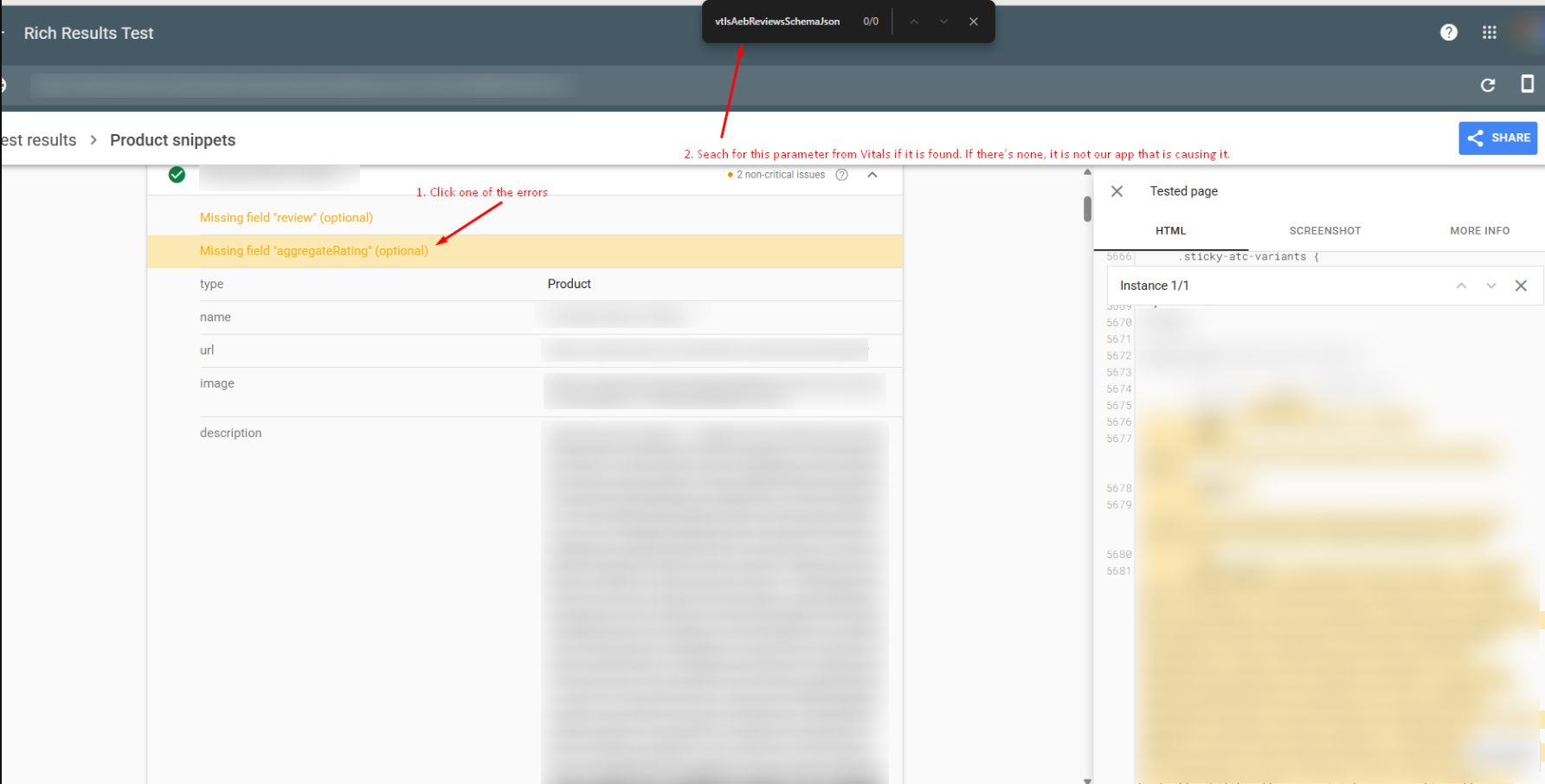
- You'll get no match — meaning that the erroring item isn't Vitals' schema. Vitals' review data always lives inside the
vtlsAebReviewsSchemaJsonblock. If no detected item contains it at all, check that Display the review rating and count in Google search is on (Product Reviews > Settings > Publishing and SEO) and that the Vitals app embed is turned on in your theme. Now open the detected item that has no errors and search again for
id="vtlsAebReviewsSchemaJson". This time it's there, with your review data intact — confirming Vitals' schema is working as expected.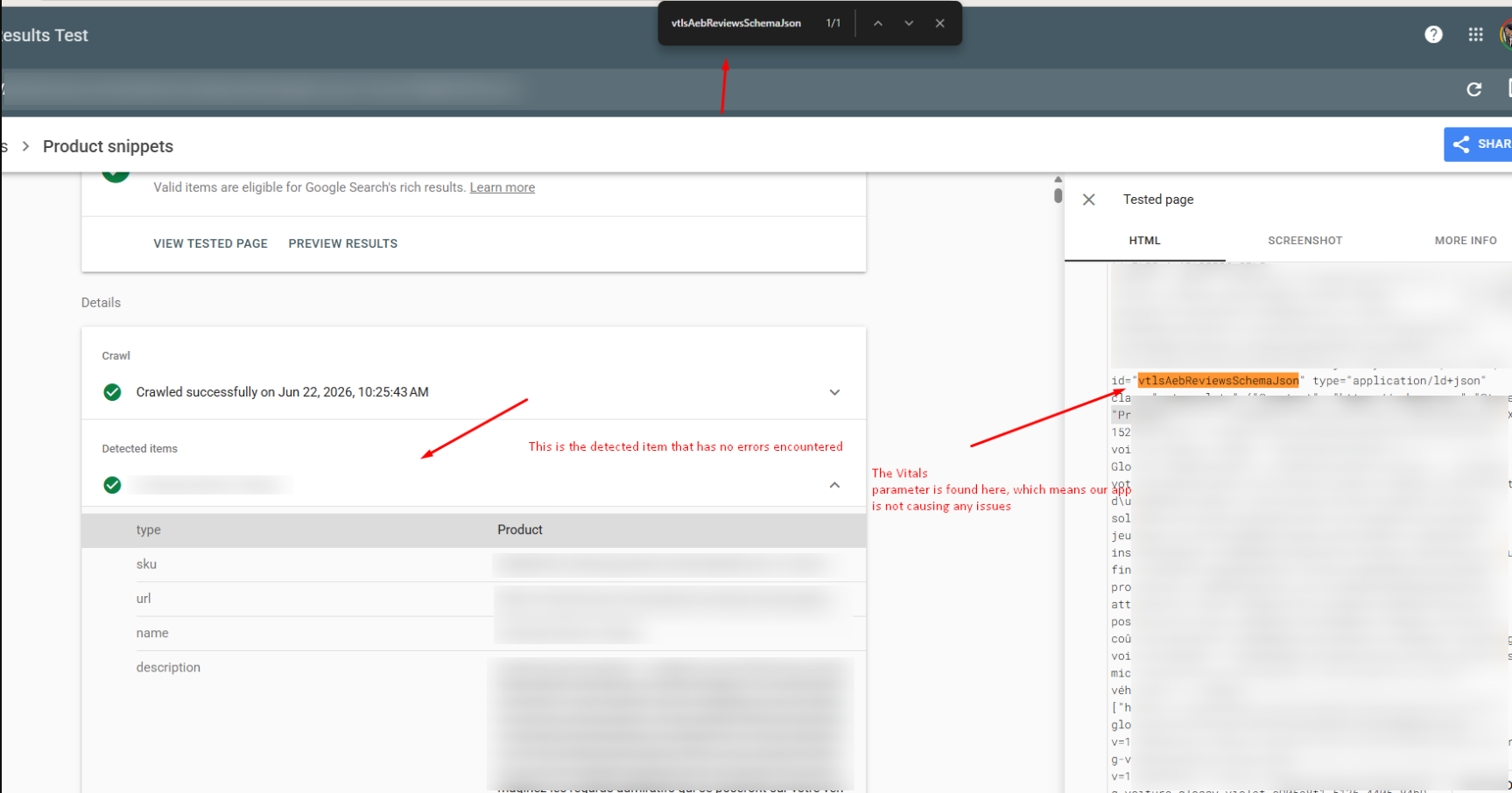
Once you've confirmed the warning belongs to another app's Product schema, reach out to that app's support team so they can adjust the structured data on their end.
Tips
- Check both detected items, not just the first. The whole point is that one item can be clean while another shows the warning — looking at only one can be misleading.
- Search for
vtlsAebReviewsSchemaJsonto settle any doubt. Its presence (or absence) tells you instantly whether a given block is ours. - Identify the other app before escalating. Whichever app owns the erroring
Productschema (commonly a Google Shopping feed app or part of the theme files) is the right team to fix it. - Give Google time. Even after structured data is correct, Google decides when and whether to display rich snippets, and re-crawling can take days or weeks.
FAQ
Google says review and aggregateRating are missing — did Vitals break?
No. Vitals stores those values in Shopify's official metafields and outputs them in its own schema block (vtlsAebReviewsSchemaJson ). The "missing" warning almost always comes from a different app's product schema on the same page. Use the Rich Results Test and search for vtlsAebReviewsSchemaJson to see which detected item the warning actually belongs to.
How do I tell which app is causing the warning?
In the Rich Results Test, open the item that shows the warning and search its source for id="vtlsAebReviewsSchemaJson" . If it's not there, that block isn't from Vitals — it belongs to another app generating product schema (for example, a Google Shopping feed app). Contact that app's support to correct it.
Is the warning caused by the Vitals script loading asynchronously?
No. The review and rating data is tied to Shopify's official metafields and is detected correctly in the Rich Results Test regardless of async script loading.
My stars still aren't showing in Google search — is that the same problem?
Not necessarily. Whether stars appear in search results is up to Google, which indexes on its own schedule and won't add rich snippets to every page even when the data is valid. See Product Reviews Rich Snippets