[NEW] Understanding the Order Tracker Analytics
Last updated on October 21, 2026
The Order Tracker app includes an Analytics tab so you can see how your shipments are doing and where they're going.
Where to find it
- Open the Vitals dashboard and go to the Order Tracker app.
- Select the Analytics tab at the top of the page, next to Settings.
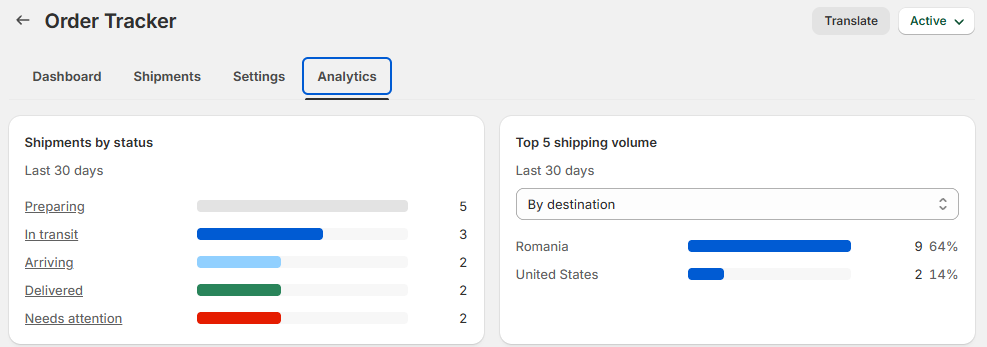
What you can see
The tab has two cards. Both cover the last 30 days.
Shipments by status
One bar for each stage of the delivery journey: Preparing, In transit, Arriving, Delivered and Needs attention. The busiest stage is listed first, and each bar shows how many shipments are in that stage. Click a stage name to open the Shipments tab filtered to just those shipments.
Shipments marked Not tracked aren't counted here, because they don't have a tracking status.
Top 5 shipping volume
Your five busiest destinations or carriers, with the number of shipments and their share of all your shipments in the period. Use the Group shipping volume by menu to switch between By destination (countries) and By carrier.
Comparing time periods
The Analytics tab always shows the last 30 days. There's no date picker or CSV export on this tab yet. For shipment-level detail, use the Shipments tab.
Frequently Asked Questions
Why are the cards empty?
The cards fill in once your shipments start tracking. If you've just turned Order Tracker on, give it a few days of fulfilled orders. "Status totals appear here once your shipments start tracking" means there's nothing to count yet.
Why don't the destination or carrier bars add up to 100%?
Each share is measured against all your shipments in the last 30 days, including shipments without a recorded destination or carrier, and only the top five are listed.
What should I do about shipments in "Needs attention"?
Click Needs attention to see those shipments in the Shipments tab. They're shipments the carrier reported a problem with, or that haven't had an update in a long time. Checking the carrier's latest update, or getting in touch with the customer before they contact you, usually saves a support conversation.
Can I see how many customers use my tracking page?
Yes, on the Dashboard tab. Customer order searches shows how many times customers looked up an order on your tracking page in the last 30 days. The Dashboard also shows Parcels tracked, Delivered and Exceptions.