Asking Shopify Sidekick About Your Vitals Data
Last updated on August 4, 2026
Ask Sidekick how your reviews, upsells, recordings, and sticky bar are doing, without opening the app
What this does
Sidekick is the AI assistant built into your Shopify admin. Vitals now hands Sidekick read access to your store's Vitals data, so you can ask questions in plain language and get an answer where you're already working.
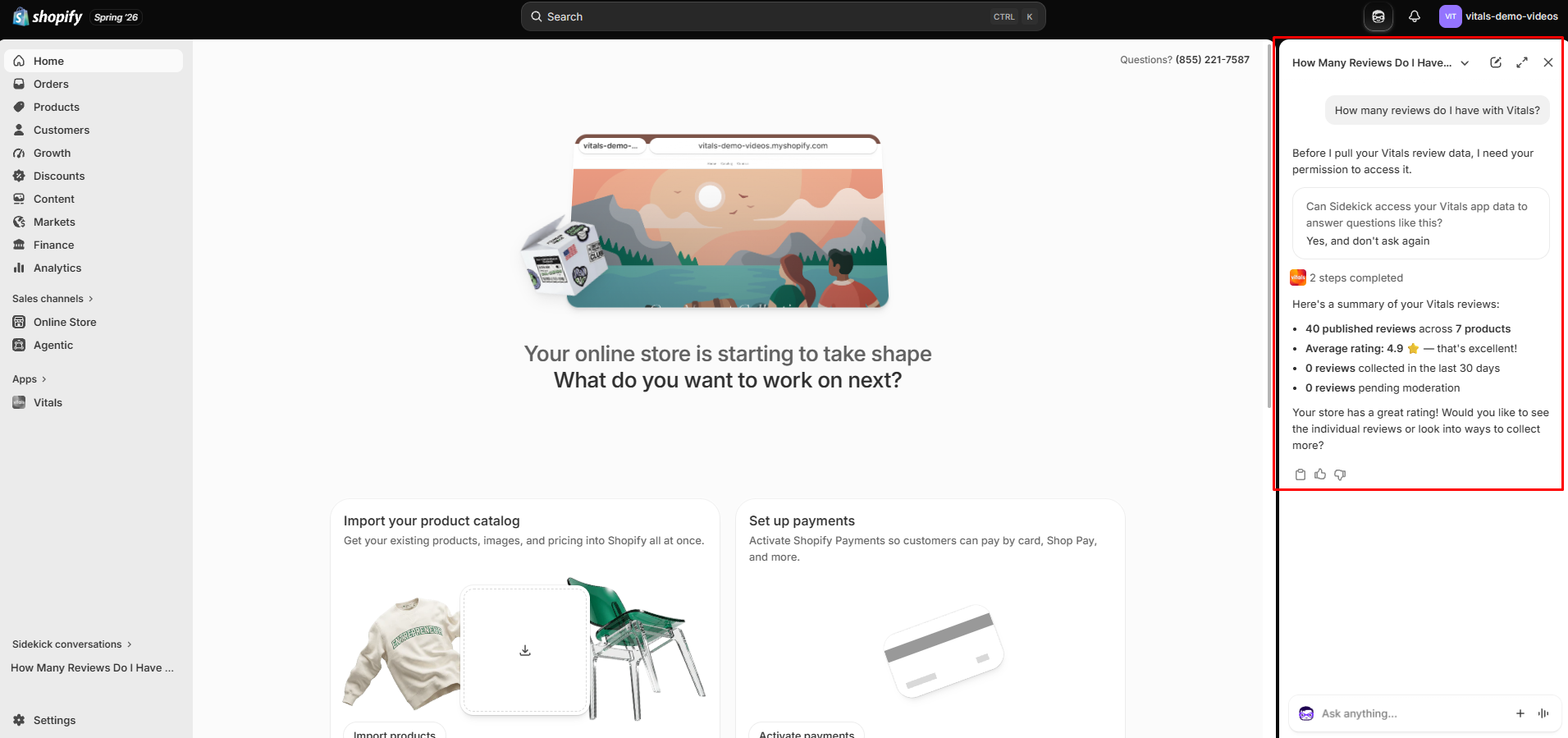
Ask "how are my Vitals reviews doing?" and Sidekick tells you your average rating, how many reviews are live, and how many wait on moderation. Ask "which of my upsell offers made the most money last month?" and it lists them. You stay in the Shopify admin the whole time.
💡Nothing to turn on. This ships with the Vitals app, so you set up no connection and flip no switch. If Sidekick doesn't answer Vitals questions yet, check that Vitals is installed and running a current version. Shopify decides where and when Sidekick itself is available.
What Sidekick can answer
Four Vitals apps feed Sidekick today:
Product Reviews
- Your store-wide picture: average star rating, published reviews, reviews collected in the last 30 days, reviews pending moderation, and how many products carry reviews.
- Your most recent reviews, newest first, up to 10 at a time. You can narrow them to a star rating ("show me my recent 1-star reviews") or to reviews awaiting moderation.
Upsell Builder
- Last 30 days of performance: revenue, orders, offer impressions, add-to-carts, and conversion rate, plus which offer type earned the most.
- How your offers stand right now: how many are active, draft, scheduled, or expired.
- A list of up to 10 offers with their 30-day numbers. Sidekick can sort by revenue, orders, views, or newest, in either direction, so "which upsells perform worst?" works as well as "which perform best?".
Visitor Recordings
- Last 30 days of session stats: sessions recorded, average duration, average pages per session, how many visitors added to cart, reached checkout, and converted, your recording-based conversion rate, the mobile share, and how many recordings you haven't watched.
- Your most recent sessions, up to 10 at a time, each with its outcome, device, traffic source, landing page, duration, page views, and the AI summary once that recording's summary is ready. You can filter by outcome or by device, so "show me recent abandoned-checkout sessions on mobile" works.
Sticky Add to Cart
- Last 30 days of performance: revenue, orders, impressions, add-to-carts, and conversion rate.
- Whether the bar is live: whether the app is on, whether the bar shows on mobile and on desktop, and whether the combination adds up to a bar your shoppers see.
Other Vitals apps aren't wired into Sidekick yet.
What Sidekick can't do
⚠️Sidekick can only read. It publishes no reviews, replies to nobody, turns no offer on or off, and changes no setting. To act on what it tells you, open the app in Vitals.
A few other boundaries worth knowing:
- Ten records at a time. Lists of reviews, offers, and sessions cap at 10, with no way to page through to the eleventh. Narrow the question instead: ask for 1-star reviews, or draft offers, or mobile sessions.
- Thirty days of history. Performance figures and recent sessions cover the last 30 days. Sidekick can't compare quarters or pull up a recording from three months ago. Your average rating, published review count, and products-with-reviews count run all-time.
- No playback. Sidekick describes a session and summarises it. Watching the recording still happens in Visitor Recordings.
What data Sidekick can see
Sidekick reads reviewer display names and review text, and anonymous session details with their AI one-line summary. It never receives reviewer email addresses, visitor IP addresses, or customer identities, and it never receives the recordings themselves. Hidden and deleted reviews stay private, and your own admin browsing stays out of every Visitor Recordings figure.
Every answer covers your store alone. Sidekick reads the data of the shop you're signed into and no other.
Making sense of the numbers
Sidekick calculates figures live rather than reading a cached copy, so what it tells you should match your Vitals dashboards. Four things trip people up:
- Revenue comes back in USD.
- Your offer list won't add up to your upsell total. The store-wide revenue figure includes assisted orders, where an offer influenced a purchase that closed later. The per-offer figures count direct attribution alone, so they total less.
- "Reviews collected in the last 30 days" counts reviews Vitals collected. Reviews you imported from another app or a spreadsheet sit outside that number, though they still count toward your average rating and published total.
- Asking for your offers hides drafts. "List my upsell offers" returns live ones. To see the rest, ask for draft, scheduled, or expired offers by name.
Tips
- Ask the question you'd ask a colleague. "Which upsells aren't live?" and "how many reviews need moderation?" land better than app jargon.
- Narrow instead of counting. The ten-record cap bites when you ask for everything. Filters give you the ten that matter.
- Use it to triage, then act in Vitals. Sidekick is quickest for the morning check: what needs moderation, what's underperforming, whether the sticky bar is live. Fixing any of it happens in the app.
- Try it for the "why isn't it showing?" question. Sidekick reports whether your sticky bar is on and which devices it shows on, which answers that one faster than opening the settings.
Frequently Asked Questions
Do I need to connect anything or pay extra?
No. The Vitals app carries this, so you install nothing and pay nothing beyond your existing plan.
Which Vitals apps can Sidekick see?
Product Reviews, Upsell Builder, Visitor Recordings, and Sticky Add to Cart. Every other Vitals app may be added soon, so stay tuned!.
Can Sidekick change my Vitals settings?
No. It reads and reports. Publishing a review, editing an offer, or switching the sticky bar on all happen inside Vitals.
Why does Sidekick only show me 10 reviews when I have hundreds?
Lists cap at 10 records, so Sidekick answers fast. Ask a narrower question, such as your recent 1-star reviews or the reviews awaiting moderation, and the ten you get back are the ten you wanted.
Can Sidekick tell me how last quarter went?
No. Performance figures cover the last 30 days. For longer ranges, you can open the app's own analytics.
Sidekick says I have no session recordings, but I have Visitor Recordings.
Check that Visitor Recordings app is enabled in Vitals. A store with the app switched off has nothing recorded, and Sidekick rmay report it as having no recordings.
Why don't my individual offer revenues add up to my total upsell revenue?
The store-wide total includes assisted orders, where a shopper saw an offer and bought later. Per-offer figures count direct attribution alone, so the list totals less than the summary. Both match what you see in the app.
I imported thousands of reviews. Why does "collected in the last 30 days" say zero?
That number counts reviews Vitals collected from your customers. Imported reviews count toward your published total and average rating, and Sidekick can list them, but they stay out of the collected figure.
Can Sidekick see my customers' email addresses?
No. Reviewer emails never reach Sidekick, and neither do visitor IP addresses or customer records. It sees reviewer display names, review text, and anonymous session details.
Can Sidekick play a session recording for me?
No. It describes the session and shares the AI summary. Watching the recording happens in Visitor Recordings.
Sidekick doesn't seem to know about Vitals at all. What should I check?
Confirm Vitals is installed on your store and running a current version, then ask a direct question such as "how are my Vitals reviews doing?". Shopify controls which stores get Sidekick and what it can reach, so it may take a little time to appear. If it still draws a blank, contact our Vitals support team.