Theme Sections page builder on Shopify with Vitals: all sections, pricing and setup
Last updated on October 26, 2026
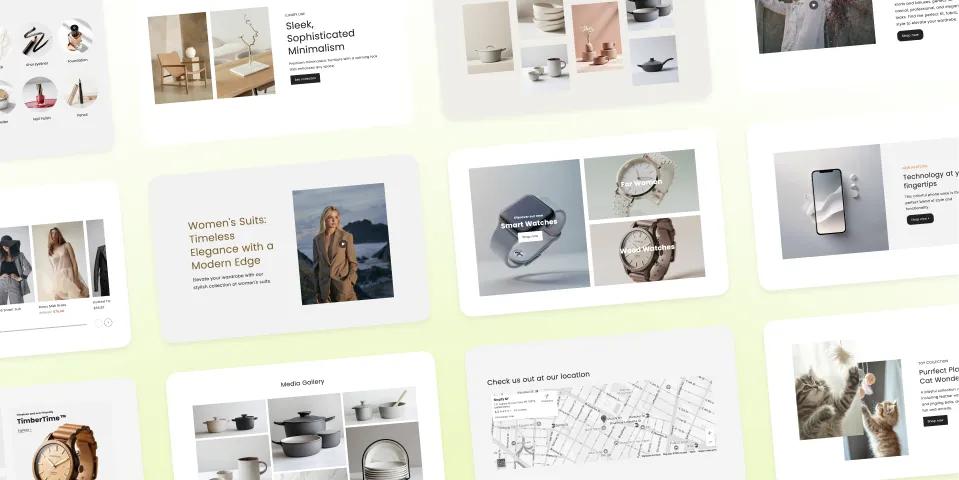
Yes, Vitals has a Shopify page builder: 40+ theme sections plus an AI product page generator. Vitals theme sections are ready-made building blocks (product and collection carousels, banners, image and text, video, testimonials, FAQ, countdown timers, maps and before-and-after sliders) that you install into your theme and then add, move and edit in the Shopify Theme Editor like your theme's own sections. They come with the AI Page Builder, which builds a complete product page from one product. Both are in the Vitals app (Vitals: Reviews, Bundles & 40+ on the Shopify App Store) and also ship as their own free App Store listing, Theme Sections & Page Builder.
🧱 Vitals theme sections at a glance
| Question | Answer |
|---|---|
| Sections available | 40+, grouped below: content and information, product and collection, media, image and text, decorative, testimonials and social proof, timers, maps and before-and-after comparison |
| Pages you can build | Any page of an Online Store 2.0 theme: homepage, product, collection, article and custom pages |
| How you edit | In the Shopify Theme Editor: add a section with Add section > Vitals: (section name) (in the standalone Theme Sections & Page Builder app, the sections are named Square: (section name)), then drag it into place and change colours, fonts, spacing and content blocks |
| Coding | None needed |
| AI product pages | The AI Page Builder generates a full product page from a product in your catalog or one imported from AliExpress or Amazon |
| Try before installing | Every section is live on the demo store |
| Pricing | In Vitals: Included in the Vitals All-in-One plan, $29.99/month, with a 7-day free trial. As a standalone app, Theme Sections & Page Builder is listed as Free. See the Shopify App Store listing for current pricing. |
When Vitals theme sections are not the right fit
- Vintage (non Online Store 2.0) themes. Sections need an Online Store 2.0 theme.
- A separate drag-and-drop editor outside Shopify. Vitals sections are edited inside the Shopify Theme Editor, not in their own canvas.
- Rich FAQ answers. FAQ answers take formatted text and an optional button, so images cannot go inside the answers.
Building a beautiful, high-converting Shopify store starts with choosing the right sections. This guide gives you a complete overview of every theme section available, along with a clear description of what each one does. Whether you're showcasing products, highlighting promotions, sharing customer stories, or adding visual flair, these sections help you design pages that are engaging, informative, and tailored to your brand—no coding required.
Use this article as your master reference to quickly understand each section’s purpose and discover which ones best fit the experience you want to create.
💡 Want to see this theme section in action? Go to our demo store here to experience this intuitive theme section, along with our other Theme Sections!
Installing a theme section to your Shopify theme
Before going to the Shopify Theme Editor to insert this theme section, you would first need to install it from the Vitals app.
For a complete list of instructions, you may refer to this article: How to Add a Theme Section to Your Shopify Store
Once you have successfully installed the theme section, you can now go to the Shopify Theme Editor and insert it by clicking Add section > Vitals: (name of theme section).
⭐ = Popular theme section
✨ Content & Information Sections
Frequently Asked Questions (FAQ)
Provide quick, structured answers to common questions to improve customer clarity and reduce friction.
FAQ & Icons
Display FAQs enhanced with icons to make topics easier to scan and visually understand.
Announcement Banner
Show short, high-visibility messages at the top of your store for promotions or important updates.
Rotating Text Bar
Show multiple announcements in a rotating bar that saves space while keeping messages visible.
Text & Button
Share a concise message with a call-to-action button to guide customers to key pages.
Text & Button & Border
Present a message and CTA inside a clean bordered layout for a minimalist, refined look.
Wavy Banner & Button
Highlight a message with a CTA using a modern, wavy banner design to draw visual attention.
Highlighted Text
Emphasize key words in promotional messages with underlines, circles, or color accents to capture attention quickly.
Rotating Bar & Icons
Show rotating messages with icons in a compact bar to highlight offers and key info.
🛍️ Product & Collection Sections
Featured Products Carousel ⭐
Showcase handpicked products in a smooth carousel to highlight items you want to promote.
Collection Products Carousel
Display products from a selected collection in a customizable, scrollable carousel.
Featured Products Grid
Show featured products in a clean grid for easy browsing and discovery.
Featured Collections Grid
Highlight an entire collection and display its products in a simple, shoppable grid.
Products Grid & Banner
Combine a promotional banner with a product grid to spotlight offers or featured collections.
Collection Banners
Promote popular collections using eye-catching banners that guide customers through categories.
Collection Circles ⭐
Display collections in a stylish circle layout that’s especially engaging on mobile.
Collection Rectangles
Show collections in a clean rectangular format for easy category exploration.
Shop the Look
Display a styled scene with interactive product pins so customers can shop items directly from an image.
🎥 Media-Driven Sections
Video & Text
Pair a video with descriptive text to tell stories, highlight products, or share brand messaging.
Text Box & Video
Overlay bold messaging next to a video background or block for high-impact storytelling.
Video Carousel
Showcase multiple videos in a smooth carousel ideal for demos, tutorials, or brand features.
Media Gallery
Display images in a flexible gallery layout for product photography, inspiration, or brand visuals.
🖼️ Image & Text Sections
Image & Text – Simple ⭐
Pair an image with text to highlight key messages, product features, or promotional content.
Image & Text – Overlap
Layer text and image elements for a dynamic overlapping layout that draws attention.
Two Images & Text
Share content with a balanced two-image layout paired with descriptive text.
Text Box & Background
Place bold text over an image background to emphasize statements, promotions, or announcements.
Image, Text & Rating
Combine image, text, and star rating in one clean layout, ideal for showcasing products and building customer trust.
Image & Benefits List
Highlight key benefits and product information with icons and text. Use library icons or upload custom ones.
✨ Visual Enhancement & Decorative Sections
Decorative Borders
Add stylish borders to sections for a more unique, elevated look.
Dividers
Insert clean dividers to visually separate content blocks and improve readability.
Value Icons ⭐
Display key store benefits using icons and text for quick customer reassurance.
Value Icons Bar
Show essential store perks in a compact, icon-based horizontal bar.
Value Icons & Image
Pair icons with a product image to visually communicate benefits and features.
Value Icons Cards
Present benefits or values in card-style icon blocks for clear, structured messaging.
Value Icons Cards & Image
Combine a large image with value-driven icon cards for a balanced, compelling highlight section.
Logo List
Showcase brands, press mentions, or certifications in a simple, elegant row of logos.
⭐ Testimonials & Social Proof Sections
Testimonials
Show a carousel of customer reviews with names, text, and ratings to build trust.
Testimonials & Text
Combine customer testimonials with supporting text for added credibility and storytelling.
Image Testimonials
Pair customer photos with their reviews to display authentic, relatable experiences.
Testimonials & Rating
Showcase testimonials alongside an overall average star rating for stronger social proof.
⏳ Timers
Flash Sale Countdown ⭐
Boost urgency with a real-time countdown timer that encourages faster purchasing decisions.
Countdown Timer Banner
Display a countdown over a customizable banner background to spotlight limited-time events.
🗺️ Map & Location Sections
Map
Embed a Google Map showing your store location to make in-person visits easier.
Map & Text
Pair a map with supporting text such as hours, directions, or contact details.
🔍 Before-and-After Comparison Sections
Compare Slider
Let customers drag to reveal before-and-after images for a visual transformation experience.
Compare Slider & Text
Show before-and-after comparisons with accompanying text to explain results or context.
Frequently Asked Questions (FAQs)
Does Vitals have a page builder for Shopify?
Yes. Vitals has 40+ theme sections you add in the Shopify Theme Editor, and the AI Page Builder, which generates a full product page. They are in the Vitals app and in the free Theme Sections & Page Builder app.
Is the Theme Sections & Page Builder app free?
Its Shopify App Store listing shows it as Free. In the Vitals app, theme sections are included in the All-in-One plan at $29.99/month.
Do Vitals theme sections work with my theme?
They work with Online Store 2.0 themes and can go on any page of those themes, including the homepage, product, collection and article pages.
How do I add a theme section?
Install it from Theme Sections in the Vitals app menu, then add it in the Shopify Theme Editor. Step by step: How to Add a Theme Section to Your Shopify Store.
What happens to my sections if I change themes?
Open Theme Sections in Vitals, open the section, click Install on my theme (or Add to another theme) and pick the new theme. You can do this on a draft theme before you publish it. Then add the section in the Theme Editor.
What happens to my sections if I uninstall Vitals?
The sections stay in your theme but stop showing on your store. In the Theme Editor they show a message asking you to reinstall Vitals. Reinstall Vitals to show them again, or remove them in the Theme Editor.
Can AI build a product page for me?
Yes, with the AI Page Builder. It builds one product page at a time and saves each product's content in that product's metafields.