Understanding the Product Reviews Quick Analytics Section
Last updated on October 21, 2026
Once your store starts receiving reviews through our Product Reviews app, you will now see different figures about its utilization for the last 30 days, at the top of Product Reviews > Dashboard:
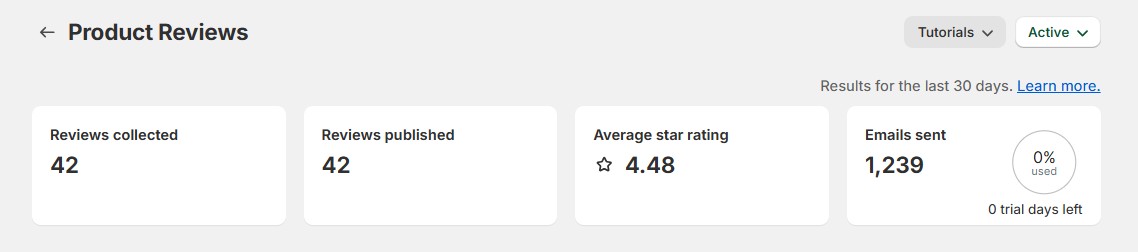
Here's some quick information about each metric:
- Reviews Collected - This will show the total number of reviews collected as organic reviews within the Product Reviews app. They can be any of the following:
- Reviews collected from customers who submitted a review via the automated review request email they received.
- Reviews that are submitted via the Product Review App on the store's product page.
- Reviews Published - published reviews added to your store in the last 30 days, including imported reviews (counted on the day you imported them). Below it you see how many reviews are live on your store in total.
- Average Star Rating - the average rating of the published reviews added in the last 30 days. Your all-time average is shown below it.
- Emails sent - If you have the Automated Reviews Requests feature enabled, this metric will show how many emails were automatically sent to your customers who purchased from your store.
Frequently Asked Questions
How frequently is the Reviews Analytics section updated?
- For the Emails Sent, this is updated every time a review request email is automatically sent to a customer.
- Reviews Published and Average Star Rating update right away. Reviews Collected updates about once an hour.
I imported reviews from AliExpress, but they are not showing under Reviews Collected. Is there something wrong?
- Reviews imported from AliExpress are not part of the Analytics section, as it will only capture organic reviews.