
Consent requirements for various apps
Last updated on November 16, 2026
Vitals reads each visitor's cookie consent from Shopify, through Shopify's Customer Privacy API. You choose the regions where visitors are asked for consent in your store's customer privacy settings. For each visitor, Shopify then tells Vitals whether they accepted, declined or have not answered yet.
For visitors in the regions you select, these apps start only after the visitor accepts both analytics and marketing cookies:
- Facebook Pixels - without consent, we do not load Facebook's script, as it would send data to Facebook. When a visitor opts out of the sale of their data, the pixels send their events with Meta's Limited Data Use option;
- Visitor Recordings – recording behavior depends on the Require cookie consent before recording setting:
- When the setting is enabled, Visitor Recordings starts only after the visitor accepts.
- When the setting is disabled (the default), recording can start before the visitor answers.
- In both cases, recording stops when the visitor declines analytics cookies. This includes a decline the visitor gave on an earlier visit.
- Recently Viewed - the widget shows, and saves the products a visitor views, only after the visitor accepts;
- Countdown Timer and Cart Notice - these show only after the visitor accepts.
Some apps work differently until the visitor accepts:
- Pop-ups - typically, you can create a few pop-ups and decide how often each one shows. Without consent, Vitals can't remember which pop-ups a visitor has already seen, so your highest-priority pop-up is offered again on each page (still following its trigger settings). A pop-up the visitor closes with one of its buttons still waits for its Frequency before it shows again;
- Recent Sales Notifications - typically, you decide how many notifications show, and each visitor first sees the sales they have not seen yet. Without consent, Vitals shows up to 3 notifications on each page view and can't remember which ones the visitor has already seen;
- Push Marketing - without consent, Vitals can't count the pages a visitor views, so each page counts as the first. A prompt delay set in Page Views to more than one page does not show the opt-in prompt until the visitor accepts. A prompt delay set in Seconds works as usual. The Push Marketing attribution cookie waits for analytics consent; it is not placed when a visitor declines analytics consent;
- Size Chart - the size system, unit and measurements a visitor picks are remembered from page to page only after the visitor accepts;
- Back in Stock and Wishlist - the cookies that remember which email a visitor clicked, to count the orders it brought, wait for analytics consent and are not placed when a visitor declines analytics consent;
- Vitals analytics - before a visitor answers, and after a decline, Vitals still sends page views and widget events (views, impressions and clicks), without a visitor ID or cart ID. Once the visitor accepts analytics and marketing cookies, these events also carry a visitor ID and the cart ID. Vitals uses this data only to show you what Vitals does for your store and how it performs, in your Vitals dashboard. We don't sell it, share it with third parties or use it for advertising.
Visitors outside the regions you select are not asked first: Shopify allows analytics and marketing for them from their first page, so the apps above work for them as if they had accepted.
Other Vitals apps do not wait for consent. This includes the Cart Notice message in the Cart Drawer (when Show the Cart Notice app message is on) and the countdowns in Upsell Builder offers and pop-ups: unlike the Countdown Timer and Cart Notice apps themselves, they show without waiting for consent, and a countdown with a fixed length saves its start time in the visitor's browser so it keeps counting across pages. You can find the cookies and other browser storage Vitals uses in Cookies used on merchant storefronts.
To choose the regions where visitors are asked for consent, do the following steps:
- Go to Shopify admin > Settings > Customer Privacy:
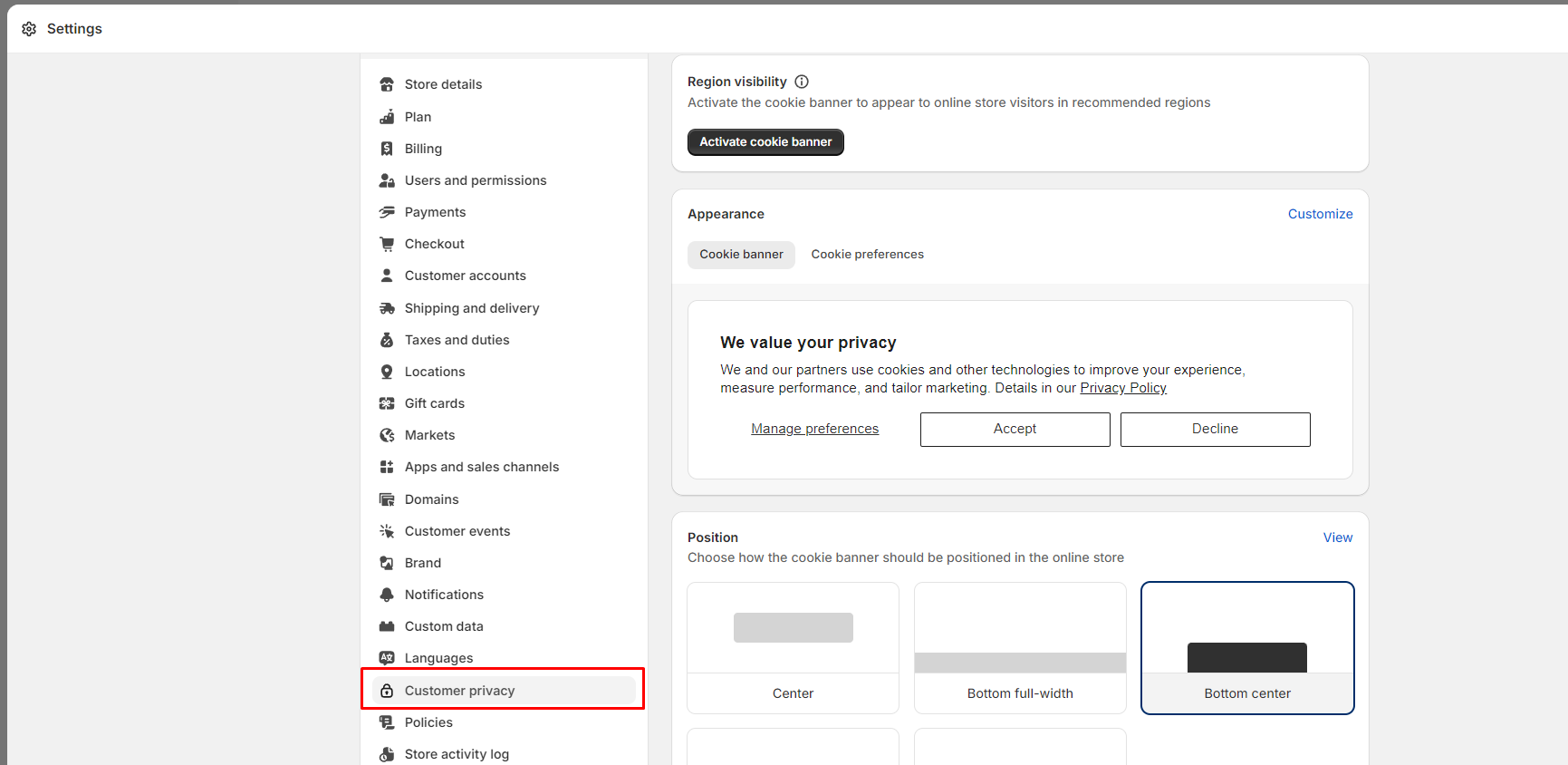
From here, you have two options that you can do - either use Shopify's own Cookie Banner feature, or you can use one from a different app, such as our Cookie Banner app.
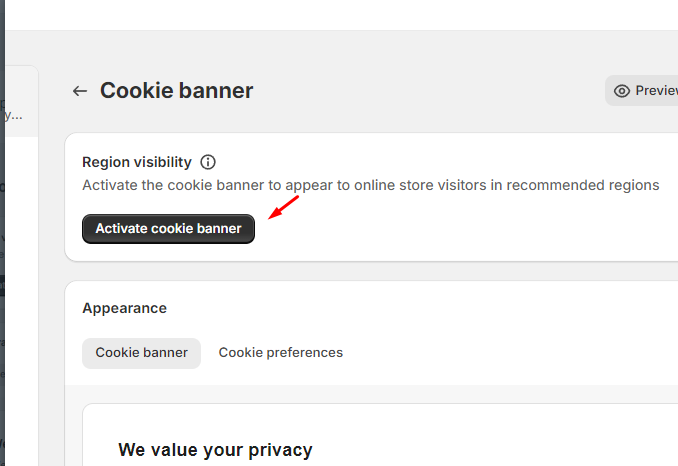
- If you would like to use Shopify's own Cookie Banner, you can simply do so by clicking the Activate Cookie Banner:
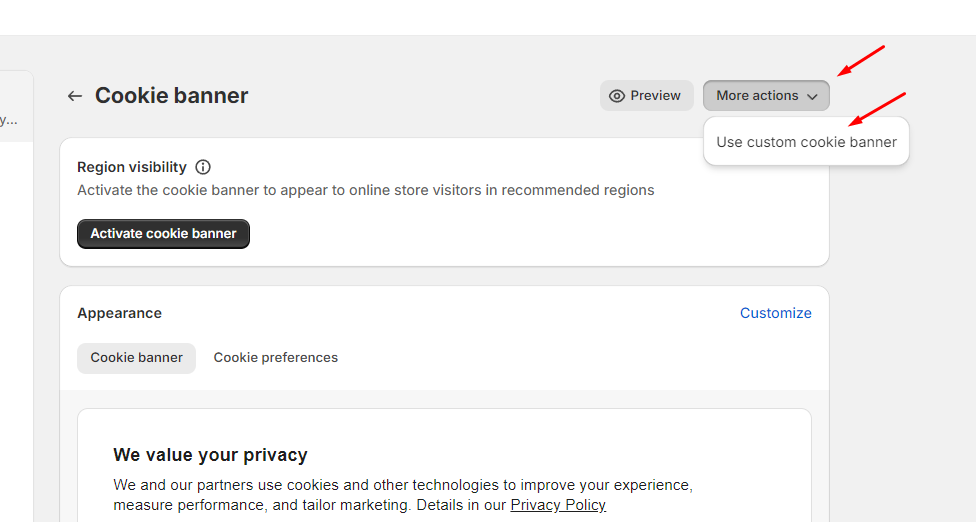
However, if you would like to use our Cookie Banner app, kindly click on More Actions > Use Custom Cookie banner instead;
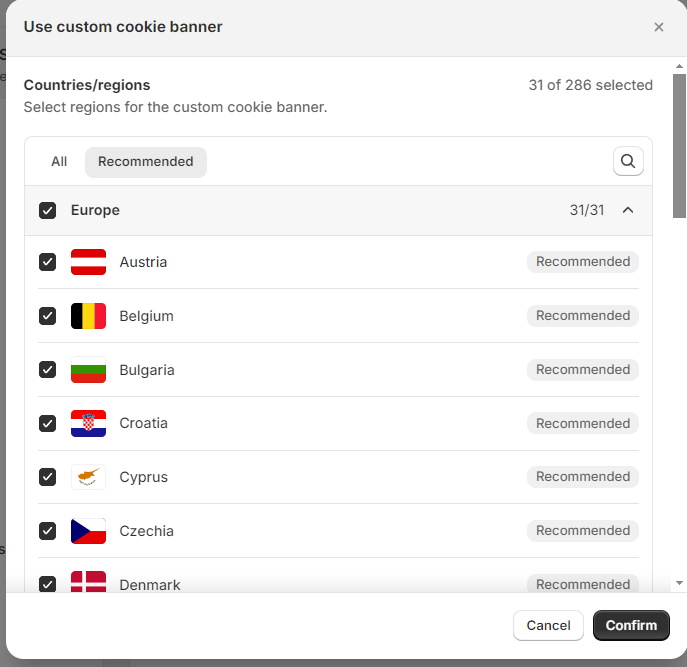
- Whichever banner you choose, Shopify shows a list of regions. Select the regions where visitors must give their consent. (Note that Shopify has already pre-selected the recommended regions that should need consent, and you will be able to confirm it.)
💡 Given the complexities around jurisdictions, privacy laws/regulations, and how you and your team intend to use Shopify and Vitals, you should seek guidance from your legal counsel on when is the best approach to use this.
Still stuck?
Chat with our support team, we'll sort it out with you.